Giving Claude full email access — without handing over my IMAP password
Most “AI + email” projects I’ve seen want your IMAP password.
They re-implement IMAP, OAuth, sync state, and delta-fetch from scratch — and then hand the agent your credentials so it can do useful work. That’s a trade I’m not interested in. One prompt-injection in an email body and the attacker has the keys to everything on my machine.
Meanwhile, my Thunderbird was sitting there. 22 accounts. 249,000 messages. Sync working. Labels, filters, junk scoring. Fifteen years of opinions about how an email client should behave, already encoded. It already has my credentials. It already knows how to talk to IMAP and SMTP servers that do weird things at 2 AM.
So I built thunderbird-cli — a CLI and MCP server that treats Thunderbird as the source of truth and exposes every capability through a thin, safe, token-efficient interface. Claude (or any MCP client, or any script with curl) can read, search, compose, reply, archive. No credentials leave Thunderbird. No new sync state. No new auth surface.
This is the story of what I shipped, what surprised me, and what I’d do differently.
What it does in one GIF
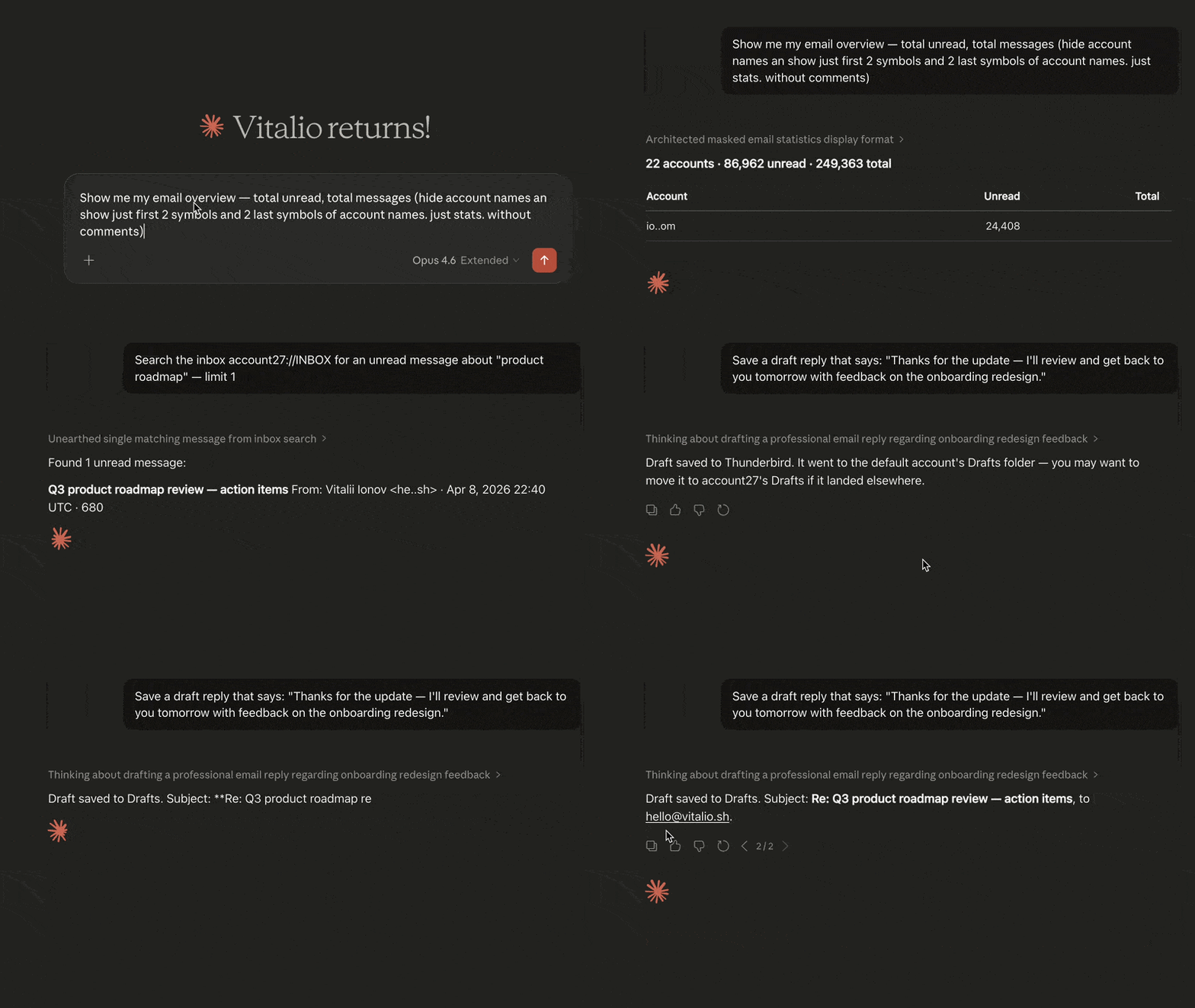
That’s Claude Desktop asking a natural-language question, calling two MCP tools (email_stats, email_search), and returning a real answer from 22 real accounts. Nothing in the data path touches a password.
The architecture, in four boxes
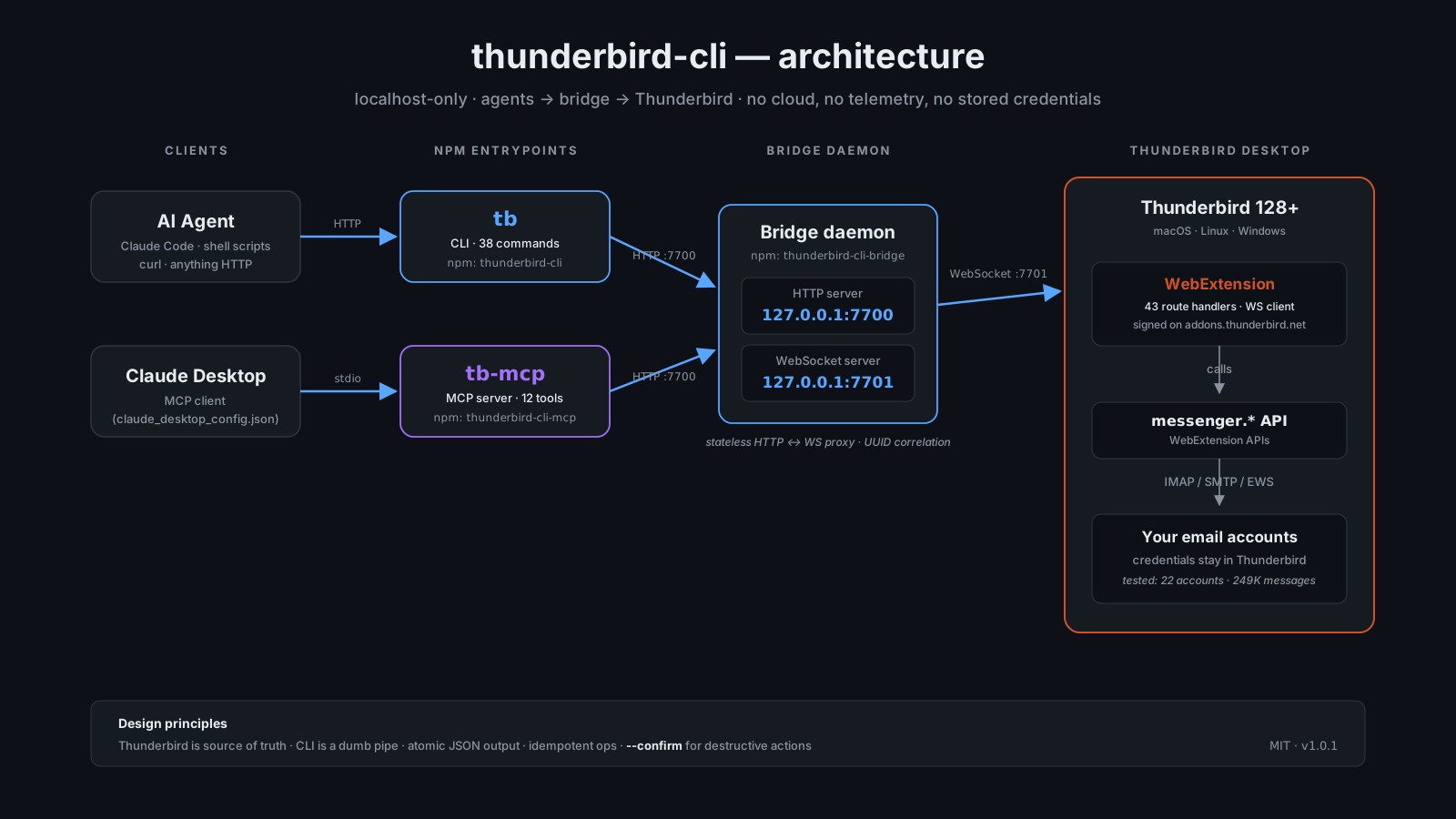
Four components. Each does exactly one thing.
- WebExtension (43 handlers): a regular Thunderbird 128+ add-on signed by addons.thunderbird.net. It’s a WebSocket client that calls
messenger.*APIs and returns JSON. - Bridge daemon (
thunderbird-cli-bridge): a stateless HTTP↔WebSocket proxy. Listens for HTTP requests, forwards them to whichever extension is connected over WS, correlates responses with UUIDs. Zero business logic. Zero state. - CLI (
tb, 38 commands): a thin JSON-over-HTTP client. Each command is about five lines of argument parsing + one fetch call + a pretty-printer. - MCP server (
tb-mcp, 12 tools): reuses the CLI’s HTTP client. Exposes a curated subset of operations with safe defaults, not the entire CLI surface.
The split between “bridge” and “CLI” is the thing I’d most want an agent using this stack to understand. The bridge is the only component that holds state (one open WebSocket). The CLI is aggressively stateless — you could have ten tb processes running concurrently and they’d be indistinguishable. That’s what makes it safe to hand to agents that fan out.
Why expose CLI and MCP both, not just MCP?
The MCP tool set is smaller than the CLI. 12 tools vs 38 commands. That’s deliberate.
Bulk operations — tb bulk delete --from newsletter@ --older-than 90d — are great for power users and dangerous for autonomous agents. An LLM hallucinating a broader filter than you meant is a story I don’t want to star in. So the MCP server offers email_archive (one at a time), not email_bulk_delete. If you want bulk, you reach for the CLI.
The two surfaces share an HTTP client (mcp/src/client.js just imports from cli/src/client.js). One wire format. One place to fix bugs.
Real numbers from a real deployment
I developed this against my actual inbox. Every design decision was informed by how badly it worked at scale.
| Measure | Value |
|---|---|
| Accounts configured in Thunderbird | 22 |
| Total messages | 249,203 |
| Unread | 86,825 |
| Folders across accounts | 387 |
| IMAP providers covered | Gmail, iCloud, Fastmail, Migadu, Protonmail Bridge, generic IMAP |
A few things that fell out of that:
--fieldsand--compactare not optional for agents. A singletb searchreturning 500 messages with full headers is ~60 KB of JSON. That’s most of a context window gone. Letting the agent ask forid,author,subject,dateonly turns that into ~4 KB.--max-body <chars>saved me more context than anything else. Truncating body text to 500 or 2000 characters is plenty for agent summaries and costs ~10× less than “read the whole body.”- Search has to exclude junk by default. I learned this the hard way when an early prompt asked “find emails about my car insurance” and pulled 40 spam messages impersonating my insurer. MCP search now requires
--include-junkexplicitly. Filters make sense only when the default is safe.
The parts I’d keep if I were starting over
--confirm guards. I built these into delete --permanent, folder-delete, and bulk-delete. They were worth the two hours. Agents don’t forget flags the way humans forget flags.
Draft-by-default for compose/reply/forward. The MCP tools save drafts unless the agent passes mode: "send". This single default has prevented more would-be embarrassments than any other safety feature.
Trust metadata. Every read response includes junk score, SPF/DKIM status, and whether the sender is in the address book. That gives the agent enough context to judge “should I follow this link?” without me having to teach it.
Localhost-only. The bridge binds to 127.0.0.1. No TLS, no auth token (yet). If I ever ship cloud, that stays localhost. The threat model wins.
What Claude Code did vs what I did
This is a personal-interest paragraph; skip if you just want the repo.
The whole project was built in Claude Code as the primary IDE. What I noticed:
- Explaining the architecture to the agent upfront paid for itself a hundred times. The
CLAUDE.mdfile in the repo is the single biggest productivity multiplier I’ve introduced. - Refactoring was nearly free. Four different times I found I’d modeled something wrong and the agent cleanly moved the concept to a better place across 20+ files at once.
- The boring stuff was the boring stuff. Package-publishing, CI, GitHub release workflows — the agent handled it cleanly but I still had to pay attention to the details (npm 2FA, XPI packaging, MCP Registry schema changes).
The honest way to say it: this project exists because I could pair with a model on boring scaffolding and save the hard thinking for where the boundaries should be.
Try it
Install the CLI + bridge from npm:
npm install -g thunderbird-cli thunderbird-cli-bridgeInstall the signed Thunderbird extension — download the latest XPI from the releases page, then in Thunderbird: Add-ons → ⚙ → Install Add-on From File…
Start the bridge:
tb-bridgeCheck it’s alive:
tb healthAnd see what you’re working with:
tb statsFor Claude Desktop, add to claude_desktop_config.json:
{
  "mcpServers": {
    "thunderbird": {
      "command": "npx",
      "args": ["-y", "thunderbird-cli-mcp"]
    }
  }
}
Restart Claude, and ask: “How many unread emails do I have, and what are the top 3?”
Repo, package, license
- Repo: github.com/vitalio-sh/thunderbird-cli
- npm:
thunderbird-cli,thunderbird-cli-bridge,thunderbird-cli-mcp(all MIT) - Extension: signed on addons.thunderbird.net
- 80 integration tests (46 CLI/bridge + 34 MCP)
Feedback welcome via GitHub issues, Discussions, or direct message. Particularly interested in:
- Providers that behave weirdly under bulk operations
- Patterns for exposing a CLI safely to autonomous agents
- Whether the bridge should grow an auth token or stay credential-less
Built with Claude Code. MIT. Vitalii Ionov, Valencia, 2026.